
Managing your contacts using a computer, PDA’s, and address books can be difficult at times. Whenever you need the contact information, you must first find where you’ve stored it. OfficeClip’s Contact Manager enables you to organize your contacts from one central location, and access this data via the web. It allows you to schedule tasks and appointments as well as storing documents associated with your contacts. OfficeClip’s Contact Management Software is designed to run on a web server which the user can be access via a web browser, and it allows your entire organization to manage contacts remotely or within an intranet. Created using the Microsoft .Net framework, this free Contact management software provides flexible configuration and easy implementation on numerous web client devices.
This overview describes the features and functionality offered with OfficeClip’s Web Based Contact Management, which is an easy to use, affordable, enterprise level, and reliable Contact manager software solution.
Platform Independent Client
OfficeClip Online Contact Manager is designed to run on a web browser, which ensures platform independence on a desktop and mobile devices.
Powerful backend SQL Database
All contacts are stored securely on the web server with the encrypted folder names stored an MS SQL Server database, providing architectural power and flexibility in a data driven environment. The OfficeClip applications are bundled with the SQL Server (Express Edition), which provides a lowcost and low volume database solution that can later be migrated to a high load and high availability platform.
Customization
Create custom filters and reports within our Contact Software. Also, web services and developer API is available for customization.
Related Links
OfficeClip Contact Manager Manual: Html (with frames) 
Note: To open the Windows Help Format file, download the file to your computer, then right-click on it and select Properties. Next click Unblock. After unblocking the file, open by double-clicking on it in Windows Explorer.
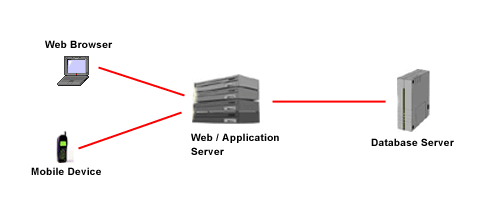
OfficeClip Timesheet Software Information Flow
OfficeClip Web Based Timesheet can be installed on an enterprise server behind a firewall and can be accessed throughout the organization via a web browser. Depending on the security needs of the organization, the web server and network can easily be configured to access OfficeClip outside the corporate firewall.

