
Improving your follow-up process is one of the most effective ways to grow your sales revenue without spending more on advertising. Business-to-business (B2B) deals usually require several conversations to close, yet many teams lose valuable leads simply because they aren’t consistent.

While you could use traditional spreadsheets to track follow-ups, a long database makes it incredibly difficult to segment your customers and prospects. A single missed call or lost spreadsheet row can lead to lost revenue. By utilizing a CRM call list software, you can organize your daily outreach and ensure every prospect gets the attention they need at exactly the right time.
1. Why Follow-ups are Critical for Sales Growth?
Most leads don’t buy on the first contact. They are busy, they are researching competitors, or they simply aren’t ready to commit. A consistent follow-up strategy keeps your brand top-of-mind and builds the trust necessary to close the deal. The issue with sales is that customers usually do not inherently trust salespeople right away. Multiple interactions create an environment of trust.
📊 Follow-Up Statistics You Can’t Ignore
No matter how many people visit your website or email you, conversion isn’t easy unless you make timely follow-ups. Consistent communication significantly increases the chances of expanding your customer base.
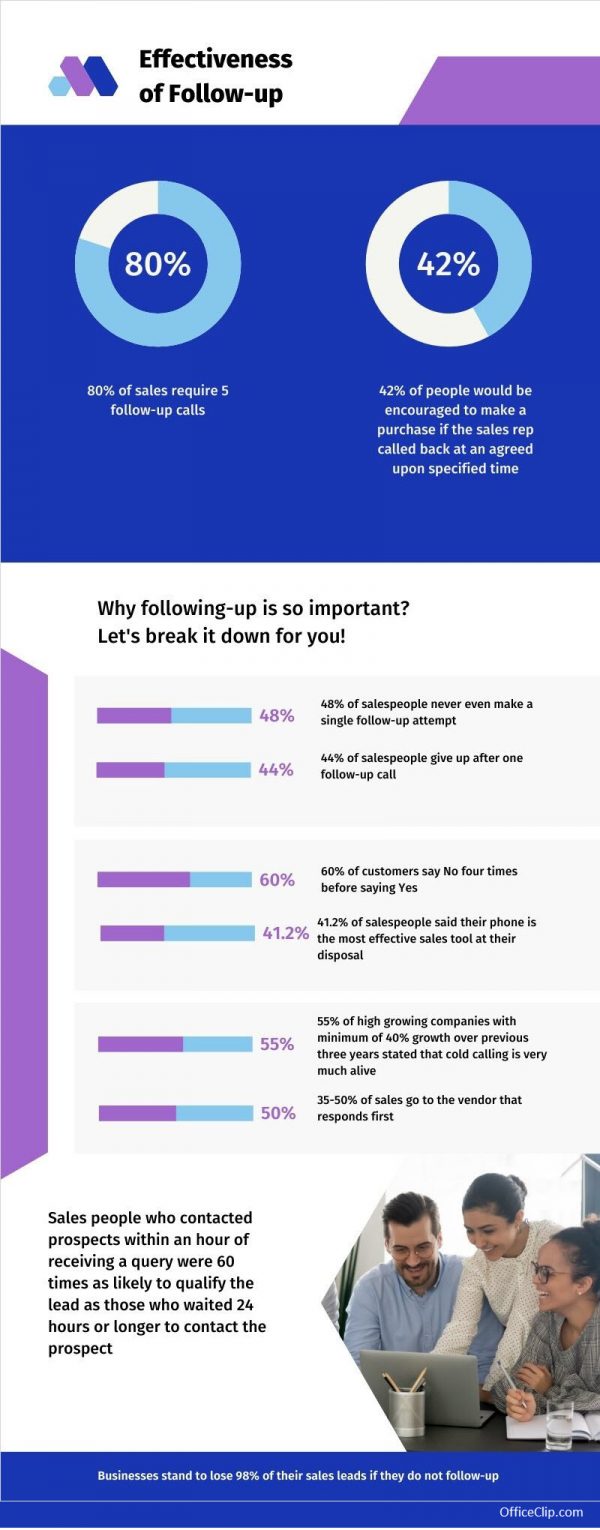
400%
conversions happen when lead is contacted within 5 minutes: Response time matters.
50%
of all sales happen after the 5th contact.
42%
of sales reps say they don’t have enough info before making a call.
2. Reasons to Follow-up With Your Customers
Keeping in touch with your customers at regular intervals demonstrates the importance you place on customer service. This connection directly improves customer retention and experience. Common reasons for follow-up include:
3. Why is Follow-up Important for Relationships?
A structured follow-up system does more than just push for a sale; it creates a holistic environment of trust for everyone involved in the transaction.
🏢 For Businesses
- Regular follow-ups slowly help build relationships with new customers or prospects.
- Diligent follow-up shows your concern towards the customer.
- It streamlines your work process and helps decide on further actions.
🎯 For Leads
- Consistent follow-up makes prospects feel valued.
- It answers all concerns and objections about the product.
- It convinces the leads how your product will be the best fit and highlights your customer service.
💼 For Sales
- A follow-up helps to resolve all the customers’ doubts.
- Getting in touch frequently positively impacts the person’s decision-making process.
- It may lead to more word-of-mouth referrals.
- Connecting builds trust, boosts sales, and increases customer retention.
Stop losing track of your valuable leads.
Organize your prospects and never miss another follow-up opportunity.
4. How is the Sales Process Handled Online?
The digital age has changed how we sell. According to Gartner Research, 85% of all sales processes will be handled online by customers without interacting with a person. This provides a massive opportunity for a rule-based contact management system to step in and handle automated or scheduled touchpoints.
Furthermore, according to Pew Research, even though 82% of American customers check online reviews before buying a product, only half actually trust them. The average sales conversion rate across all industries hovers between 2.46% and 3.26%. This creates a very strong case for why personalized follow-ups and well-maintained call lists are the key to beating average industry conversion rates.
5. Why Organizing Customer Information for Sales is Crucial?
Sales is a tedious process. According to a study done by Baylor University, an average salesperson generates just one appointment or referral after making 209 sales calls.
Having accurate information about your customers or prospects is your best weapon against a sluggish sales cycle. A Contact Management System organizes prospect information so it is available right when you need it during a meeting. Even if the primary salesperson is unavailable, anyone else from the team can seamlessly take over the sales cycle because they are equipped with all the required interaction history.
6. Free Daily Call List Templates
Downloadable Call Lists
Start organizing your follow-ups right now. Grab our ready-to-use Daily Call List templates designed specifically for sales professionals.
7. What is a Call List in CRM?
While spreadsheets are great for getting started, they quickly become messy as your business grows. That is where a CRM Call List steps in. A Call List is a prioritized reminder set to call current and potential customers at regular intervals. Call lists help sales teams stay organized, ensuring they follow up with all of their leads in a timely manner. Instead of flipping between spreadsheets and sticky notes, your team sees exactly who to contact, the reason for the call, and past interaction history all in one place.
OfficeClip Call List software simplifies this process by creating a centralized database for your contacts. Salespeople can focus entirely on making calls without having to worry about forgetting anyone.
8. Benefits of Using a Daily Call List for Your Business
Using a dedicated call management system isn’t just about speed; it’s about accuracy and long-term business outcomes. Here is why your business needs it:
- Regularly communicating with your leads, answering their pre-sales questions, and sending them targeted campaigns about current promotions helps convert leads into customers.
- Payment reminders scheduled at the end of the month or year can help ensure timely payments.
- Keeping in touch with your contacts at regular intervals and providing status updates on their projects improves communication and demonstrates professionalism.
- Connecting with customers gives you insights into their specific needs, helping you identify opportunities for product or service improvement. You can also use a pie chart creator to visually break down follow-up performance metrics and conversion distribution.
- Ultimately, following up with customers shows that you care about them. Building trust and rapport encourages them to return to you for future business.
Ready to automate your daily outreach?
Discover how easy it is to schedule and execute your daily call list.
9. Why is the OfficeClip Call List Feature Popular?
The OfficeClip Call List feature has helped countless businesses set up a bulletproof process for following up with leads. Here is why teams love it:
- Comprehensive Context: For every contact within a call list, you can add notes, events, and tasks. These notes give an overview of past discussions and help plan future steps.
- Action-Oriented: Integrated events help you instantly fix a meeting for conversions directly from the call screen.
- Team Collaboration: All team members can access notes and tasks related to contacts, keeping everyone in the loop.
- Easy Prioritization: With a list of all calls centralized on one screen, reps can easily prioritize their most important deals for the day.
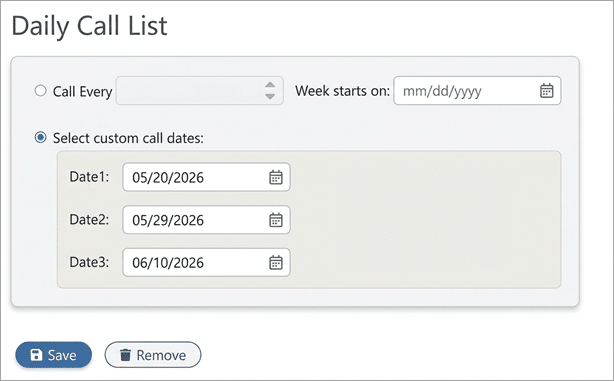
- Customization: Users can effortlessly create Weekly Call Lists or filter their database to generate highly specific Custom Call Lists.
10. How OfficeClip Organizes Your Daily Follow-Up List?
Rather than staring at a massive, overwhelming database, OfficeClip’s Contact Management System breaks your outreach down into manageable, highly organized views:
- Create Weekly and Custom Call Lists: Generate weekly call lists for your leads, or build a custom list tailored to your needs.

- Viewing Call Lists: Easily view your upcoming calls for the entire week so you can allocate your time effectively and plan your daily schedules accordingly.

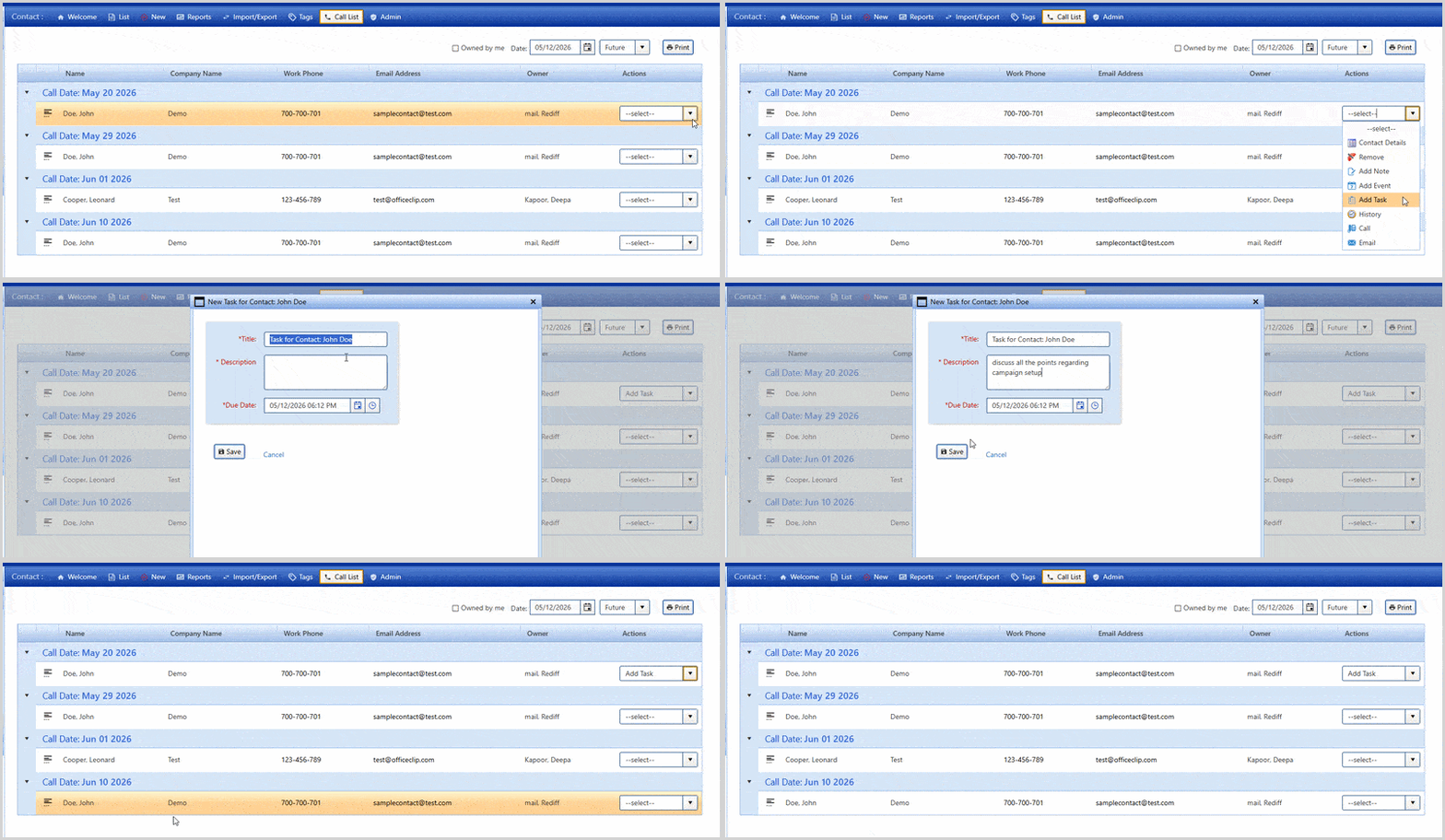
Because all scheduled events and tasks are saved directly into the CRM, there is no guesswork involved. You know exactly who needs to be called today, tomorrow, and next week.
11. Best Practices for Getting the Most From Your Call List
To maximize your results and close more deals, encourage your sales team to implement these best practices into their daily routine:
- Block Dedicated Time: Create a daily call schedule and dedicate time each day for working through call lists without distractions.
- Be Prepared & Punctual: Always call on time. Review the customer’s information before dialing so you can provide clear, concise answers to address their specific pain points.
- Always Schedule the Next Step: When communicating with leads, schedule the next call at a convenient date and time before hanging up. This helps avoid voicemails and creates momentum.
- Update Notes Immediately: Update your CRM database with new information right after each call so context is never lost.
- Send a Recap: After each call, send a follow-up email thanking the customer for their time and summarizing the key takeaways.
- Review and Re-Segment: Regularly review your call lists to ensure you are focusing your energy on the most promising opportunities.
Ready to Close More Deals?
Stop letting valuable leads fall through the cracks. Enhance relationships with your customers through consistent, organized communication using OfficeClip’s Call List and Contact Management tools.
Start Your Free Trial TodayNote: This blog was originally published in 2021 and has been updated.

Deepa Kapoor is an online writer for small businesses. She loves to write on the advancements of new technologies and how it affects our lives. She always explores ways to make small businesses more profitable. When not writing, she enjoys reading books and cooking exotic traditional food.


