Sometimes when you copy and paste a note from Microsoft Word to OfficeClip, you will see the note garbled up in OfficeClip. See below for and example of this:
To overcome this problem, please follow the steps below:
Edit the note which is not showing properly
Select all content (by clicking Ctrl + A)
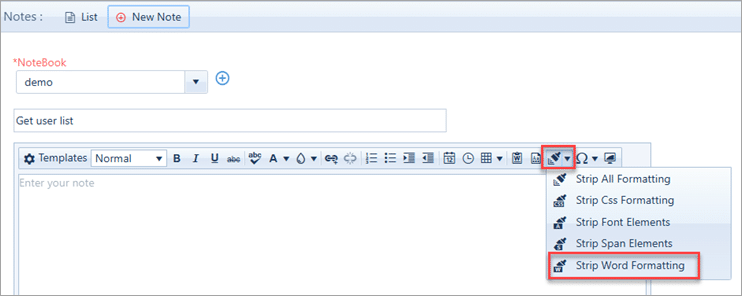
Click on Format Stripper icon >> Click on Strip Word Formatting as shown below and the save the note.
During pasting from word, OfficeClip will prompt if you want to strip word formatting, clicking on Ok will remove all MS Word formatting.
Sometimes when you copy and paste a note from Microsoft Word to OfficeClip, you will see the note garbled up in OfficeClip. See below for and example of this:
To overcome this problem, please follow the steps below:
Edit the note which is not showing properly
Select all content (by clicking Ctrl + A)
Click on Format Stripper icon >> Click on Strip Word Formatting as shown below and the save the note.
During pasting from word, OfficeClip will prompt if you want to strip word formatting, clicking on Ok will remove all MS Word formatting.


During pasting from word, OfficeClip will prompt if you want to strip word formatting, clicking on Ok will remove all MS Word formatting.



