
Forum breadcrumbs - You are here:OfficeClip ForumsCustomer Corner: Good Practices (How To's)Show Time Off Category in the Tim …
Show Time Off Category in the Timesheet

SK Dutta@skdutta
207 Posts
#1 · April 18, 2018, 12:18 pm
Quote from SK Dutta on April 18, 2018, 12:18 pmTo make sure that the time off category is shown in the OfficeClip timesheet you will need to make sure that the appropriate parameters are set in both the Time Off and the Timesheet application.
Time Off Application
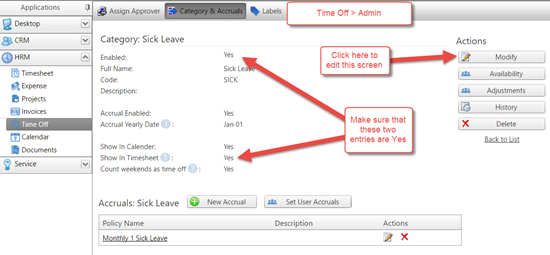
- Go to Time Off > Admin
- Select Category & Accruals
- Make sure that the Enabled and the Show in Timesheet is set to Yes. If not, click on Modify and set them.
Timesheet Application
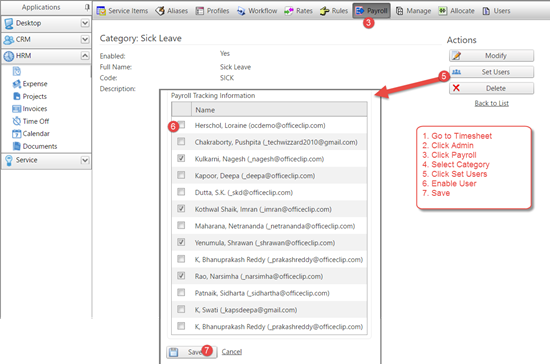
- Go to Timesheet
- Click Admin
- Click Payroll
- Select Category
- Click Set Users button
- Select the users who should see this category on their timesheet
- Click on Save
Timesheet Profile
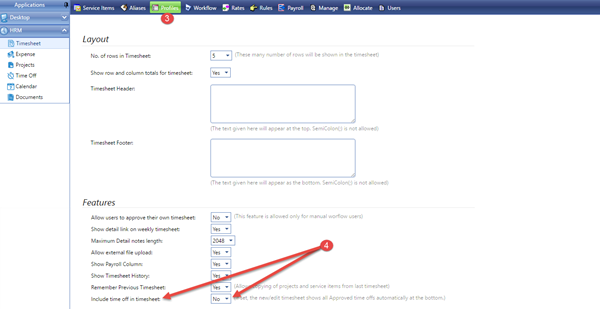
- Go to Timesheet
- Click on Admin
- Click on Profile
- Set "Yes" to "Include time off in timesheet:" inside Features
- Click on Save button at the button
To make sure that the time off category is shown in the OfficeClip timesheet you will need to make sure that the appropriate parameters are set in both the Time Off and the Timesheet application.
Time Off Application
- Go to Time Off > Admin
- Select Category & Accruals
- Make sure that the Enabled and the Show in Timesheet is set to Yes. If not, click on Modify and set them.
Timesheet Application
- Go to Timesheet
- Click Admin
- Click Payroll
- Select Category
- Click Set Users button
- Select the users who should see this category on their timesheet
- Click on Save
Timesheet Profile
- Go to Timesheet
- Click on Admin
- Click on Profile
- Set "Yes" to "Include time off in timesheet:" inside Features
- Click on Save button at the button
Click for thumbs down.0Click for thumbs up.0


