
Tracking employee time off often starts with a spreadsheet, email request, or verbal approval. That may work for a very small team, but it becomes risky when managers lose track of requests, balances are calculated manually, and multiple employees ask for leave during busy periods. A PTO policy should prevent those problems before they affect payroll, staffing, and employee trust.
A small business PTO policy defines who is eligible for paid time off, how leave is earned, how employees request it, who approves it, what happens to unused balances, and how time off is tracked for payroll and staffing. A good policy is clear, fair, legally reviewed, and easy to manage without spreadsheet errors.
PTO Accrual Balance Calculator
This free template will help you calculate weekly and monthly accrual rates, determine accurate current and year-end PTO balances, and keep track of days taken versus days remaining for your employees.
In this guide, we will walk through how to design a fair PTO policy, calculate accruals, avoid common tracking problems, and decide when a template is enough versus when PTO software is a better fit.
1. What should a PTO policy include?
A PTO policy explains how employees earn, request, use, carry over, and track paid time off. For a small business, the policy should not only define vacation or sick leave; it should also prevent staffing conflicts, payroll errors, unclear approvals, and disputes over unused balances.
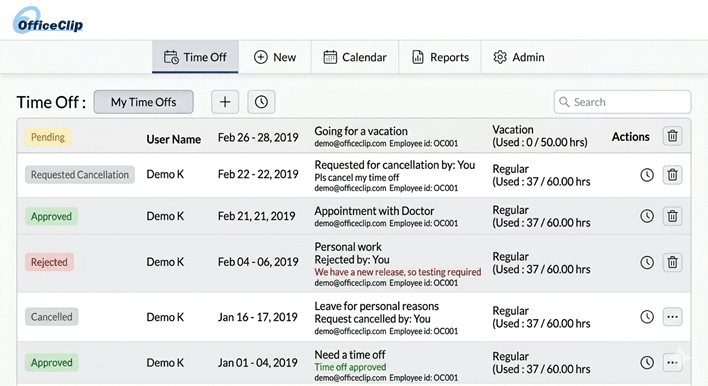
Well-structured PTO policies are a key component in attracting and retaining top talent, as they demonstrate an employer’s commitment to valuing employees and fostering work-life balance, which often leads to increased productivity and satisfaction.
2. What decisions should every PTO policy define?
| PTO Decision | What to Define | Why it Matters |
|---|---|---|
| Eligibility | Full-time, part-time, probation period | Prevents confusion |
| Leave Categories | Vacation, sick, personal, bereavement, jury duty | Helps tracking and reporting |
| Accrual Method | Hourly, monthly, yearly, anniversary-based | Affects payroll accuracy |
| Carryover | Use-it-or-lose-it, capped carryover, unlimited | Controls financial liability |
| Approval Workflow | Manager, HR, multi-step approval | Prevents staffing conflicts |
| Payout on Termination | Paid, unpaid, state-specific | Legal and financial risk |
| Tracking Method | Spreadsheet, form, HR/PTO software | Determines accuracy and transparency |
3. What are the main types of PTO Policies?
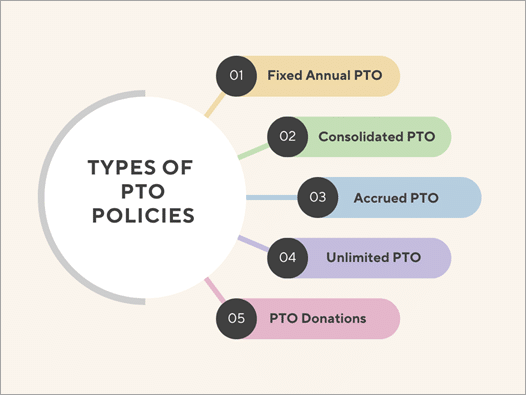
When deciding on a Paid Time Off (PTO) policy for your business, there are a few main options. The best choice depends on your company culture and how you want to manage your team. Here are the most common types:
| Policy Type | What it is | How it works | Why consider it |
|---|---|---|---|
| 1. Fixed Annual PTO | The company gives employees a set number of days off for the entire year right from the start. | Employees get their full allowance at the beginning of the year or anniversary. Unused days may expire or roll over. | Straightforward and predictable. Employees and managers know exactly what is available. |
| 2. Consolidated PTO | Puts all types of time off (vacation, sick, personal) into one single “bucket.” | Employees get a set number of days and can use them for whatever they need without specifying the reason. | Incredibly simple to track. Gives employees flexibility to handle their personal lives without pressure. |
| 3. Accrued PTO | Employees earn time off gradually as they work. | Earn a few hours per paycheck or month. Usually includes a cap on how much can be saved up. | Feels fair because it’s based on hours worked. Better predicts absences and controls balances. |
| 4. Unlimited PTO | Take as much time as needed, as long as work gets done and managers approve. | No set days to track, no time “earned.” Relies entirely on trust and responsibility. | Heavily promotes work-life balance. Attracts talent and usually avoids payouts upon termination. (Offered by 8% of companies). |
| 5. PTO Donations | Allows employees to give unused time off to a coworker in need. | Colleagues donate saved-up days to a shared pool for someone facing a major crisis. | Creates a caring workplace. Acts as a safety net. (Allowed by 28% of companies). |
4. Which PTO model is best for your business size?
| Business Type | Recommended PTO Model | Why |
|---|---|---|
| 1–10 employees | Simple fixed annual PTO or spreadsheet/template | Easy to explain and administer |
| 10–50 employees | Accrued PTO with approval workflow | Better control and fairness |
| Project-based teams | Accrued PTO + calendar visibility | Helps avoid resource conflicts |
| Professional services/accounting/IT | Accrued PTO tied to timesheet/calendar | Better scheduling and billing awareness |
| High-trust salaried team | Flexible/unlimited PTO with minimum usage guidance | Works only with strong accountability |
Ready to digitize your PTO Tracking?
Stop wrestling with spreadsheets. Let OfficeClip automate your accruals, approvals, and carryovers.
Explore OfficeClip Time-Off5. How do you calculate PTO accrual?
PTO calculations can be done for different periods as some employees are paid Hourly, Daily, Weekly, Monthly, or Bi-Monthly. Before you calculate, you need to decide how many hours your employees will accrue. Accruals also differ from employee to employee, often depending on years of service.
If a full-time employee receives 120 PTO hours per year and works a standard 2,080-hour schedule, the accrual rate is:
120 ÷ 2,080 = 0.057692 PTO hours per hour worked.If the employee works 80 hours in a biweekly pay period, they accrue 4.62 PTO hours for that period.
Financial Payout Example:
Dan is a salaried employee who accrues two days of casual monthly leave for 24 days per year. Dan has used six PTO days this year and accrued 18 days. Depending on company policy, these 18 days may be carried over to the following year or paid out to Dan in cash.
Suppose we consider that Dan earns $200 per day. Total time offs remaining are 18, so the total compensation for the time offs will be: 18 days X $200 = $3,600 before paying taxes.
Hourly Accrual Breakdown Example:
- If you give your employees time off of 3 weeks, that will approximately be 120 hours (considering 8 hours/day for 5 days a week).
- There are 52 weeks in a year, and one week consists of 40 hours of work.
- A year consists of 52 weeks X 40 hours = 2080 working hours.
- To find the accrual rate per hour, divide time off hours by work hours: 120 / 2080 = 0.057692.
• Per Hour: 0.057692 hours
• Per day: 0.057692 X 8 hours = 0.46 hours
• Weekly: 0.057692 X 40 hours = 2.31 hours
• Bi-weekly(Every 2 weeks): 0.057692 X 80 hours = 4.62 hours
• Semi-monthly(Twice a month): 120 hours / 24 pay periods = 5 hours
• Monthly: 120 hours / 12 months = 10 hours
• Yearly: 0.057692 X 2080 = 120 hours
This calculation can be set in your time-off software system to automatically calculate yearly accruals for employees working on various schedules.
6. What PTO workflow should a small business follow?
Check Balance: Employee checks their available PTO balance.
Submit Request: Employee formally submits a time-off request.
Review Conflicts: Manager reviews staffing levels and project conflicts.
Make a Decision: Manager approves, denies, or asks for changes.
Update Balance: Approved PTO automatically updates the employee’s balance.
Update Calendar: Time off appears on the shared company or team calendar.
Payroll Processing: Payroll or HR reviews PTO used during the current pay period.
Year-End Review: Year-end carryover or payout rules are applied to the account.
7. The 8-Step PTO Policy Checklist
Use this checklist to ensure your Paid Time Off policy is clear, compliant, and easy to manage.
1. Eligibility
Define exactly who qualifies for time off. Does it apply only to full-time employees, or do part-time and contract workers get prorated benefits? When do new hires become eligible to take their days?
2. Categories
Decide how you will group the time off. Will you use a Consolidated PTO model (one single bucket for all absences) or separate categories (Vacation, Sick Leave, Personal Days)?
3. Accrual
Determine how employees get their time. Do you grant a Fixed Annual allowance upfront on January 1st, or do employees earn time gradually per pay period? If accrued, set clear maximum earning limits.
4. Carryover (Rollover)
Establish the year-end rules. Can employees carry unused days into the next year, or is it a strict “use it or lose it” policy? If they can carry time over, set a maximum cap on how many days transfer.
5. Approval Process
Set the ground rules for taking time off. How much advance notice is required? How many team members can be off at the same time? Specify how employees should submit requests.
6. Payout
Define what happens to unused PTO when an employee leaves the company (whether they resign or are let go). Be very clear on whether accrued time is paid out as a cash equivalent.
7. Compliance
Review your payout and sick leave rules against federal, state, and local labor laws. Many jurisdictions legally require employers to pay out accrued vacation time or mandate a minimum number of paid sick days.
8. Tracking
Decide how you will monitor balances. Avoid spreadsheets—use a dedicated tool like OfficeClip Time-Off software to give employees self-serve access to their balances and streamline manager approvals.
Grab Your Free PTO Policy PDF Checklist
Ensure you don’t miss any critical legal or functional steps. Download our free checklist.
Download the Checklist Now8. What PTO mistakes should small businesses avoid?
- No Written Policy: When rules aren’t in writing, employees don’t know how to request time off or what their balances are. This creates confusion, uneven treatment, and potential conflicts.
- Manual Spreadsheets: Tracking time off in Excel or Google sheets leads to errors, forgotten entries, and lost data. It also takes up hours of admin time.
- Unclear Carryover Rules: If you don’t clearly state whether unused days roll over or expire at the end of the year, employees might save up massive amounts of time off, leading to critical staffing shortages later.
- No Manager Approval Trail: Approving time off via verbal agreements or texts makes it impossible to track. A missing paper trail leads to scheduling disputes.
- No Calendar Visibility: When teams can’t see who is scheduled to be out, projects stall because key people accidentally take off the same week.
- Not Checking State/Local Laws: Different states have strict, unique legal requirements regarding paid sick leave and payouts. Ignoring these can lead to heavy legal fines.
9. How to run this PTO Workflow in OfficeClip?
Setting up a great PTO policy is only half the battle – you also need an easy way to run it. If your policy includes different types of time off, OfficeClip Time Off software brings everything into one central system, eliminating manual tracking by automating categories, rules, and approvals.
1. Define Your Leave Categories
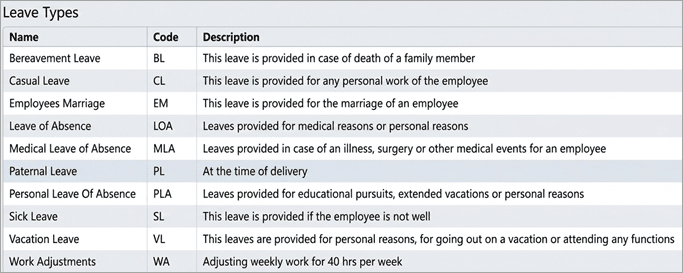
You don’t have to lump all time off together. OfficeClip lets you create distinct buckets for Vacation, Sick Leave, Personal Leave, or any custom category your business needs.
2. Automate Your Accrual Policies
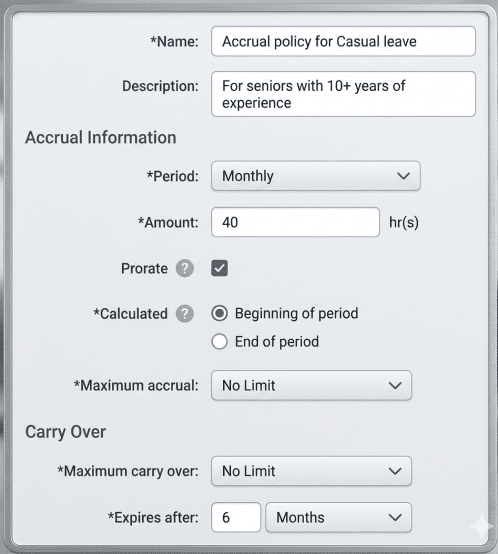
Set up your rules once and let the software do the math. Choose whether time is given upfront or earned over time. It automatically enforces carryover limits and balance caps.
3. Streamline the Approval Workflow
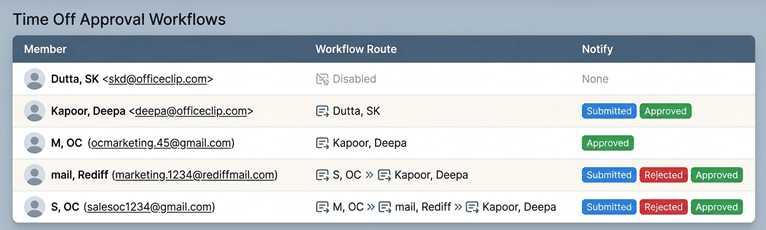
Employees can request time off in just a few clicks. The system instantly routes the request to the correct manager for review, creating a permanent, clear audit trail.
4. Give employees balance visibility
Employees can check balances without asking HR.
5. Gain Instant Calendar and Report Visibility
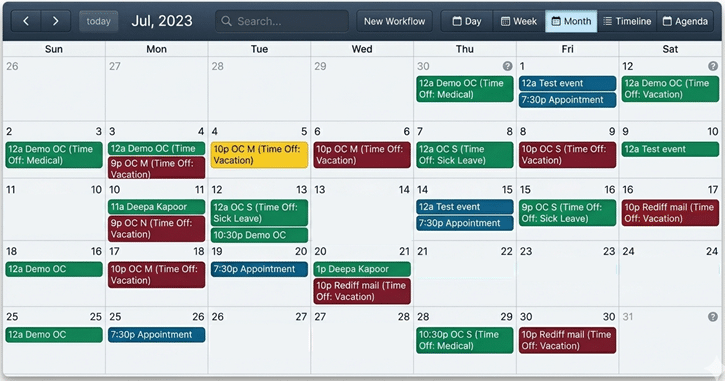
Managers and teammates can see a shared calendar of who is out. This prevents accidental scheduling conflicts and ensures your business always has enough coverage.
6. Connect PTO to timesheet/payroll review
Approved leave becomes easier to reconcile with payroll and time records.
Stop Guessing Your Team’s Balances
Automate your PTO tracking, enable employee self-service, and get back to growing your business.
Start Your Free Trial10. Time off policies in different countries
Every country has different time-off policies. There is no federal requirement for U.S. private employers to provide paid vacation leave. Separately, the Family and Medical Leave Act may provide eligible employees of covered employers up to 12 workweeks of unpaid, job-protected leave for qualifying family and medical reasons. PTO, sick leave, payout, carryover, and denial rules may also vary by state and local law. According to the US Bureau of Labor Statistics, 77% of private employers offer paid time off.
- Entry-Level (1 year): 11 days
- Mid-Career (5 years): 15 days
- Experienced (10 years): 18 days
- Senior-Level (20+ years): 20 days
Read more: Time off policies in different countries.
11. When is a PTO template enough, and when do you need software?
| Use a Spreadsheet Template when… | Use PTO Software when… |
|---|---|
| You have fewer than 10 employees | You have multiple leave categories |
| PTO is simple and rarely changes | You need automated accruals and carryover |
| One person manages approvals | Multiple managers need to approve requests |
| You do not need real-time balance visibility | Employees need self-service access to balances |
| Payroll is handled entirely manually | PTO directly affects payroll, timesheets, or scheduling |
12. Free PTO Templates
To help you get started manually, we have provided a comprehensive collection of free downloadable templates. Choose the format that best fits your company’s workflow:
PTO Request Templates
A standard form for employees to request dates off. Available in multiple ready-to-use formats so you can easily integrate it into your physical paperwork or digital workflows.
13. Free Calculator
PTO Accrual & Balance Calculator
Need to do the math? Best for small companies using a fixed annual policy, this spreadsheet helps you estimate PTO earned, used, and remaining. It automatically calculates accrual rates and projects year-end balances.
14. FAQ
Yes, you can deny a specific request for time off if it conflicts with business needs. However, in California, accrued PTO is legally considered earned wages. While you can manage when an employee uses their time, you cannot take the earned time away from them or implement a “use-it-or-lose-it” policy.
It depends entirely on your culture. Unlimited PTO operates on trust and reduces administrative tracking. Accrued PTO offers predictability and provides a structured, equitable system tied directly to hours worked.
In the U.S., there is no single federal law requiring private employers to provide paid vacation. However, employers may have obligations under federal, state, or local laws for protected absences. Businesses should review state and local rules before finalizing PTO denial policies. For example, during COVID, Healthcare workers had a tough time taking time offs due to increased work pressure. The hospitality industry rarely allows its employees to take time offs during weekends or special seasons.
There are no state or federal laws that require employers to provide a vacation to part-time employees. Employees who do not have regularly scheduled work hours are not entitled to get paid time off. However, it is up to the employers to decide, based on budgets, whether to give paid vacation to part-time staff.
Personal time offs are a part of Paid time offs. These are usually taken for medical appointments, family emergencies, or visiting a child’s school.
It combines all forms of leave—vacation, sick days, and personal time—into a single “bank” of days. This simplifies tracking for management and gives employees flexibility without having to justify the specific reason for their absence.
Also known as leave-sharing, it allows employees with unused accrued time to donate their days to a company pool to help colleagues facing personal crises.
Businesses generally manage unused time in one of three ways: allowing a set number of hours to carry over, cashing out the unused days, or implementing a “use-it-or-lose-it” rule (where legally permitted).
Your legal obligation depends on your location. Some states classify accrued vacation time as earned wages, making payouts legally mandatory upon termination.
While not always legally required, offering prorated PTO to part-time workers ensures fairness across your team, boosts morale, and helps retain good staff.
Note: This article is for general business planning and software workflow guidance. Employers should review state and local rules or consult a payroll/legal advisor before finalizing a PTO policy.

Deepa Kapoor is an online writer for small businesses. She loves to write on the advancements of new technologies and how it affects our lives. She always explores ways to make small businesses more profitable. When not writing, she enjoys reading books and cooking exotic traditional food.


