
What is Time-Tracking software and Why it matters?
Time‑tracking software is a digital tool that records how much time people spend on specific tasks, projects, and clients, replacing manual methods like paper timesheets and spreadsheets.
It automates logging work hours, breaks, and overtime, which reduces administrative effort, minimizes errors, and ensures accurate records for payroll and client billing.
For small businesses, agencies, and project‑based teams, modern time‑tracking solutions also support project management and compliance by giving managers real‑time visibility into work progress, costs, and utilization.
By providing a clear, centralized view of how time is used across the organization, timesheet software helps improve accountability, streamline workflows, and increase profitability.
Essential features of a Time-tracking software:
1. Check-in/Check-out:
Why it matters: Accurate check‑in/check‑out prevents time theft and ensures employees meet required daily hours.
A core function of any time tracking solution is the ability to accurately record work hours through check-in/check-out functionality or built-in timers. This feature precisely captures the start and end times of work periods, including breaks, providing a clear record of time spent on the job.
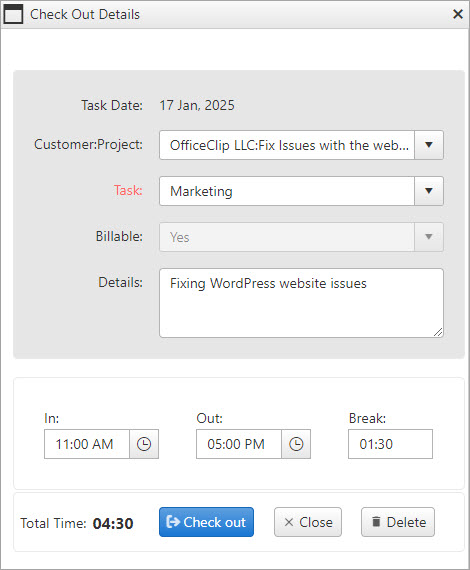
This is particularly valuable for organizations with flexible work schedules, where employees can begin work at various times but are required to complete a specific number of hours. The check-in/check-out or timer feature allows employees and managers to easily monitor accumulated work time and ensure that required hours are met.
2. Reports and Analytics:
Why it matters: Good reports turn raw timesheet data into decisions and improvements.
Comprehensive reporting is crucial for gaining actionable insights into employee performance, work patterns, and project status. These reports provide valuable data for analyzing employee productivity, identifying areas for improvement, and informing resource allocation decisions.
This reporting feature empowers businesses to optimize workflows, improve efficiency, and make data-driven decisions by offering a clear overview of project progress and team performance.
3. Project Management:
Why it matters: When time tracking is integrated with project management, managers get real‑time visibility into tasks, budgets, and workloads, so they can keep projects on schedule, stay within budget, and prevent team overload.
Effective project management is crucial for businesses handling multiple projects simultaneously. A time-tracking system should offer built-in project management capabilities, enabling users to:
- Create and manage tasks: Break down projects into smaller, manageable tasks.
- Set deadlines and track progress: Assign due dates to tasks and monitor their completion status.
- Monitor budgets and expenses: Track project spending and ensure adherence to allocated budgets.
- Manage resources and workforce: Allocate resources and track team member contributions to each project.
The project management module streamlines project workflows improves collaboration and provides a centralized view of project status, budgets, and resource allocation. This comprehensive overview empowers teams to identify bottlenecks, proactively address potential issues, and make data-driven decisions to optimize project delivery.
4. Timesheet Approval Workflow:
Why it matters: A clear, automated timesheet approval workflow ensures that only validated hours reach payroll and billing, reducing errors, disputes, and compliance risks.
A streamlined timesheet approval process is essential for accurate payroll processing. This requires a clear workflow for managers to review, validate, approve, or reject submitted timesheets.
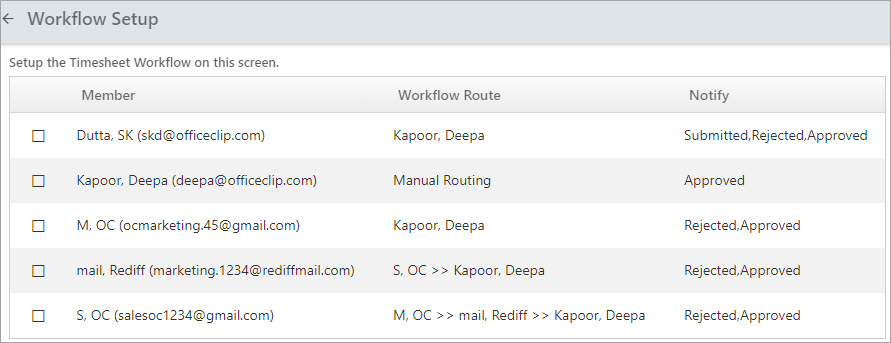
The system should offer flexible routing options, allowing timesheets to be routed to a single approver or through multi-level approvals (two or more people), depending on the organization’s specific needs.
5. Mobile Accessibility:
Why it matters: Mobile time tracking lets remote and field employees record hours accurately in real time, reducing missed entries and ensuring reliable data for payroll, billing, and project costs.
A mobile app is crucial for remote or on-site employees without desktop access. A mobile time tracking app allows employees to conveniently track their work hours and submit timesheets from anywhere, ensuring accurate time recording regardless of location.
The time tracking software should offer seamless functionality across various devices, ensuring uninterrupted time tracking whether employees are in the office or in the field.
6. Integrations:
Why it matters: Integrating time tracking with payroll systems like QuickBooks or ADP eliminates manual re‑entry, cuts payroll errors, and speeds up processing so employees are paid accurately and on time.
Seamless integration with existing payroll systems, such as QuickBooks or ADP, is crucial for efficient and accurate payroll processing. The time tracking software should facilitate the automated transfer of time and attendance data, eliminating manual data entry and minimizing the potential for errors. This integration streamlines payroll workflows and ensures accurate employee compensation.
7. Notifications and Alerts:
Why it matters: Automated reminders and status alerts keep timesheets accurate and on time without managers constantly chasing people, which improves payroll accuracy and overall compliance.
A notification system is essential for ensuring timely timesheet completion and efficient workflow management. This system should provide automated reminders to employees for daily time logging and weekly timesheet submissions.
Furthermore, managers should receive timely notifications regarding submitted, approved, and rejected timesheets to facilitate prompt review and processing.
8. Absence Management:
Why it matters: Tracking leave and other absences in the same system as work hours prevents payroll errors, supports fair leave policies, and gives HR clear insight into attendance trends.
In addition to tracking work hours, effective absence management is crucial for accurate payroll processing and overall workforce management. This includes tracking various types of employee time off, such as paid time off (PTO), vacation time, sick leave, and other authorized absences.
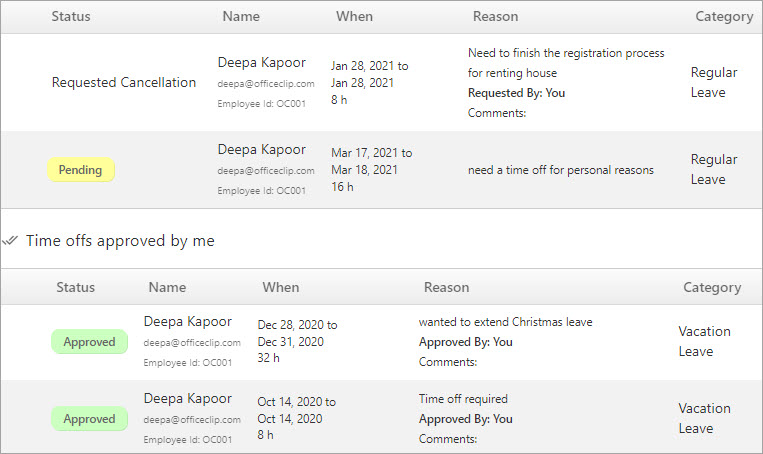
A system for managing these absences ensures accurate payroll calculations and provides valuable insights into employee attendance patterns.
9. Compliance:
Why it matters: Built‑in compliance rules and warnings help organizations follow internal policies and regulations (including standards like DCAA), reducing audit risk, penalties, and disputes over hours.
Employees must follow company rules when tracking their time. For example, a company might require employees to work at least 9 hours daily. If someone doesn’t meet that requirement, the time tracking system should warn them when they submit their timesheet. This compliance feature lets companies set rules for filling out timesheets.
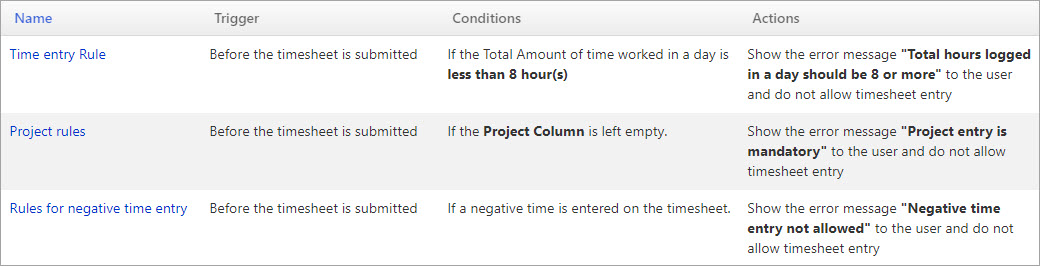
Some companies, especially those working on government contracts, must also follow special government rules (like DCAA). So, a sound time-tracking system needs a compliance feature to help organizations follow all the necessary rules.
10. Security:
Why it matters: Strong security controls protect sensitive employee and project data from breaches and misuse, safeguarding both workers’ privacy and the organization’s reputation.
Time tracking software often stores sensitive employee data, including personal information, work hours, and confidential business reports. Therefore, robust security measures are paramount. Choosing a solution with strong security protocols is essential to protect this data and ensure business confidentiality.
Beyond the core features, a user-friendly interface is essential for maximizing adoption and minimizing training time. Employees should be able to easily log their time and submit timesheets from any device through intuitive navigation. A seamless user experience ensures rapid team adoption and efficient use of the time-tracking system.
Effective time tracking is no longer a luxury in today’s fast-paced business environment—it’s a necessity. While numerous time-tracking solutions are available, selecting the right one can be challenging. OfficeClip offers a comprehensive suite of features designed to meet the diverse needs of modern businesses, including multi‑level approvals, detailed reports and analytics, time‑off tracking, and DCAA‑ready compliance settings.
Together, these capabilities provide a robust and versatile solution for managing time, attendance, and project costs in one place.
FAQs:
Start your Free trial of OfficeClip timesheet software and see how quickly it fits into your existing projects, approval workflows, and payroll processes.

Deepa Kapoor is an online writer for small businesses. She loves to write on the advancements of new technologies and how it affects our lives. She always explores ways to make small businesses more profitable. When not writing, she enjoys reading books and cooking exotic traditional food.


